
scivi / open source / splitflap
A departure board in React Native, played by Core Animation
October 4, 2026 · updated October 5, 2026 · react-native-splitflap
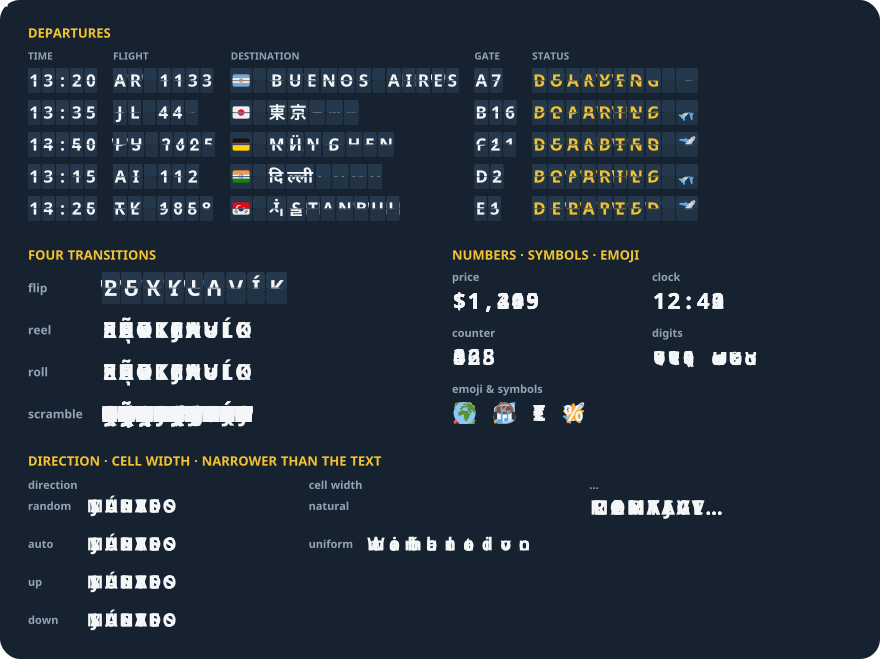
react-native-splitflap is a React Native component that turns a change of text into a split-flap departure-board animation, in React Native and Expo: every changed letter flips, spins through its alphabet, rolls or flickers into place. It has one required prop, text, and four transitions: flip, reel, roll and scramble. This is how it is built.
npx expo install @enavermate/react-native-splitflapPlan once in JavaScript, never run per frame
A change of text goes through a planner written in TypeScript. It splits the text into cells the way a reader sees characters — a flag, a family emoji, a keycap, a Devanagari or Thai syllable is one cell — and gives every cell its path through the alphabet, a delay, a duration, an easing and a direction. The plan is plain data. It crosses to native once, and JavaScript does nothing more until the next change. Both players take the same plan, so iOS and Android show the same animation, and a test checks that every Android cell is where the planner puts it at every instant.
iOS: a glyph atlas and four layers per cell
A board never draws text while it moves. Every glyph it can show is rasterised once into one image, the atlas, and a cell shows a glyph by moving its contentsRect over it. Atlases are cached per font, colour, spacing and scale under an 8 MB budget and dropped on a memory warning.
Each cell is a container CALayer with four glyph layers, and the plan is baked into Core Animation keyframes, so the animation runs in the render server rather than in the app.
- Drum transitions (
reel,roll) alternate two layers along the path — even glyphs on one, odd on the other — inside aCAGradientLayermask that fades the top and bottom of the cell - Flip uses all four: two static halves and two flaps hinged on the middle line, with perspective from the cell's centre. The top flap folds from 0 to 90° in the first half of a step, the bottom flap drops from 90° to 0 in the second. The halves are painted with the colour under the board, so the half a flap covers never shows through
- Scramble flickers one layer through letters of the target's script and locks on the landing glyph
One measurement shaped the masks: a single mask over the whole board was 3–4 fps slower on roll and reel with sixty boards on an iPhone, because any moving cell then redrew every cell under it. Each drum cell keeps its own fade.
Measured like <Text>, by a Fabric shadow node
The library is a Fabric component for one reason: its size. A C++ shadow node, shared by iOS and Android, answers Yoga's measure call. It measures each glyph through the same TextLayoutManager React Native's <Text> uses and sums them — cells are never kerned against each other — so a settled board draws every glyph exactly where a <Text> with the same style would, truncation to "…" included.
Measuring the thirty-odd letters of an alphabet on every text change cost the JS thread 2–6 fps with sixty boards, so alphabet widths are measured once per alphabet set, font and scale. That is what cell widths are built on: natural reflows like text, and uniform gives every cell one width, like a station board. Without either, each transition takes its best look — flip and scramble sort letters into narrow, regular and wide cells. Digits are tabular by default, so numbers keep their width either way.
Changes mid-flight continue, they do not restart
A new text can arrive while the board is still turning. The planner retargets from where every cell is at that moment: on iOS the player reads what each presentation layer shows, including a flap caught mid-fold at its presented angle; on Android it evaluates the old plan at the current time. The board never jumps back to the old text first.
Android: the same plan on a Canvas
The Android player follows the iOS one: the same plan, the same curves, the same four renderers. What differs is the machinery. iOS bakes each plan into keyframes; on Android every frame evaluates each cell as a pure function of time and draws it on a Canvas. Glyphs sit where the shared shadow node measured them, so a settled board matches <Text> there too.
Scripts, not languages
A cell rolls through the alphabet of its own letter's script, read from the text: Latin, Cyrillic, Greek, Armenian, Georgian, the Indic and Southeast Asian scripts, the kana and many numeral systems. Each script has one alphabet for all its languages, and a word travels only through the core letters and the extra letters it contains. Anything without an alphabet — CJK, Hangul, symbols — changes in one step, so no script can break a board.
Numbers
- Sixty boards changing at once: 101–116 fps on an iPhone 15 Pro Max
- No dependencies besides
reactandreact-native: no Reanimated, no Skia - Tested on Expo SDK 54–57, React Native 0.81–0.86, iOS and Android, New Architecture only
The same board in Swift and on the web
The iOS player was Core Animation from the start, so it stands on its own: SplitflapKit is the board as a Swift package, Splitflap(text) for SwiftUI and SplitflapView for UIKit, on iPhone, iPad and the Mac through Mac Catalyst. Its planner is a line-by-line port of the TypeScript one, and a test runs 131 scenarios through both and requires the same plans.
The TypeScript planner itself went to the web as splitflap: a <split-flap> element for HTML, Vue, Svelte and Angular, a React component and a canvas player. The picture at the top of this page is drawn from those plans, so a text animates the same way in React Native, in a native app and in a browser.
Try it
import { Splitflap } from '@enavermate/react-native-splitflap';

<Splitflap text={gate} transition="flip" surfaceColor={theme.card} />
Source, the full API reference and recipes: GitHub · npm. MIT licensed. Issues and ideas are welcome.