
scivi / open source / splitflap
A departure board for SwiftUI and UIKit, baked into Core Animation
October 5, 2026 · SplitflapKit
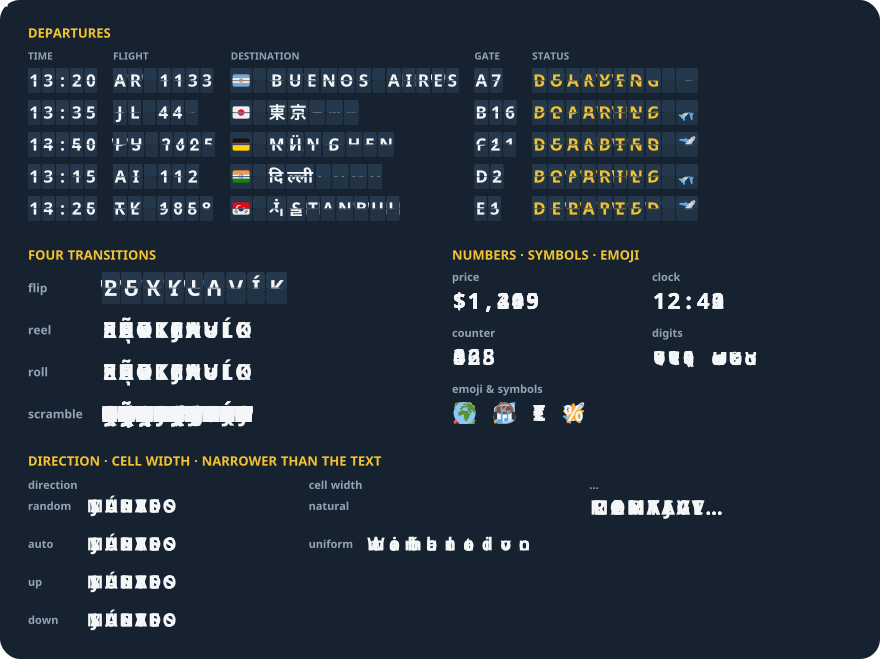
SplitflapKit is a Swift package that turns a change of text into a split-flap departure-board animation: every changed letter flips, spins through its alphabet, rolls or flickers into place. It is Splitflap(text) for SwiftUI and SplitflapView for UIKit, on iPhone, iPad and the Mac through Mac Catalyst, with no dependencies.
.package(url: "https://github.com/enavermate/SplitflapKit", from: "0.5.3")import SplitflapKit
Splitflap(gate)
.splitflapTransition(.flip(surface: .black))
.splitflapFont(size: 28, weight: .bold)A plan first, then keyframes
A new text goes through SplitflapPlanner, a pure Swift module. It splits the text into cells the way a reader sees characters — a flag, a keycap, a Devanagari or Thai syllable is one cell — and gives each cell a path through its alphabet, a delay, a duration, an easing and a direction. The view bakes that plan into Core Animation keyframes and hands them over. From then on the motion runs in the render server: no timer, no display link, nothing in your code per frame.
Text drawn once, into an atlas
A board never draws text while it moves. Every glyph it can show is rasterised once into one image, and a cell shows a glyph by moving its contentsRect over it. The tiles share one width, the widest glyph's, so a layer's bounds never change while its contentsRect steps through a path. Atlases are cached per font, colour, spacing, line height and scale under an 8 MB budget, and dropped on a memory warning.
Layers that take turns
reelandroll: two glyph layers alternate along the path — even glyphs on one, odd on the other — under a per-cell fade mask, wider than any cell can be, so a cell that changes width never uncovers an edgeflip: two static halves and two flaps hinged on the middle line, with perspective whose vanishing point is the cell's centre. The top flap folds toward the viewer, the bottom one drops into place. The halves are painted with thesurfacecolour, so the half a flap covers never shows throughscramble: the cell flickers through letters of the target's own script, then locks on it
A new text mid-flight continues from where it is
When the text changes while the board is still turning, the view reads what every cell's presentation layer shows at that moment — for a flap caught mid-fold, the angle it is presented at — and plans the next change from there. The board never jumps back to the old text first.
It lays out like a label
SplitflapView has the intrinsic size of a one-line UILabel in the same font, and ends in "…" when it is narrower than its text. Fonts follow Dynamic Type. For VoiceOver the board is one static-text element with the full text, not a row of letters, and Reduce Motion shows each change at once — or set .splitflapReduceMotion(.always) or .never. In SwiftUI every setting is a modifier that writes into the environment, so one .splitflapFont on a stack styles every board inside it.
Numbers and widths
Digits are tabular by default, so a price or a clock keeps its width as it turns. Cell width is natural, which reflows like text, or uniform, one width for every cell like a station board; without either, flip and scramble sort letters into narrow, regular and wide cells. Loading is built in: random words spin in the script of the text to come, then the real text lands.
The same plans as React Native and the web
The planner is a line-by-line port of the TypeScript one inside react-native-splitflap and splitflap for the web. A test runs 131 scenarios through it and requires exactly the plans the TypeScript planner writes, so a text turns the same way in every library. The planner's tests run on a Mac and on Linux; the view is UIKit, and the package stops a build for any platform it does not support, so none looks supported that is not.
Try it
let board = SplitflapView(text: "MADRID")
board.transition = .roll()
board.text = "LISBOA"
Source, the full API and a demo app: GitHub · Swift Package Index. MIT licensed. Issues and ideas are welcome.