
scivi / open source / splitflap
A departure board for every web framework, drawn on one canvas
October 5, 2026 · @enavermate/splitflap
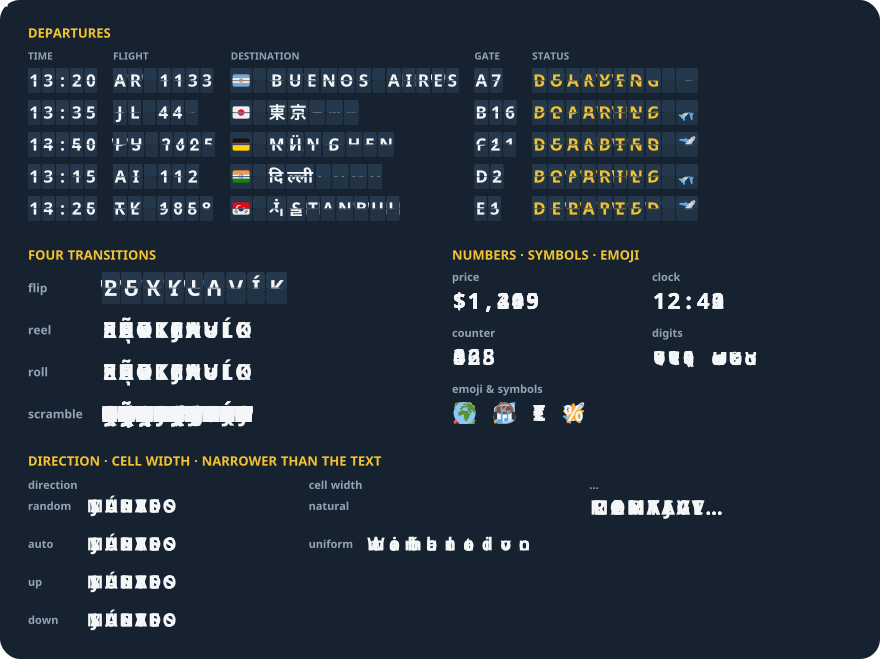
splitflap turns a change of text into a split-flap departure-board animation in the browser: every changed letter flips, spins through its alphabet, rolls or flickers into place.
npm install @enavermate/splitflapOne package, every framework
<split-flap>, a custom element, for plain HTML, Vue, Svelte, Angular and anything else that renders HTML. Without a build step it is one tag from a CDN<Splitflap>for React 18 and 19SplitflapBoard, the player behind both, for any element and any code
Each was checked with the built package: plain HTML, React 18 and 19, Next.js 16, Vue 3.5, Svelte 5 and Angular 22, in Chrome, Firefox and Safari's engine, at desktop and iPhone sizes. It has no dependencies.
<script type="module" src="https://cdn.jsdelivr.net/npm/@enavermate/splitflap@0/dist/element.js"></script>
<split-flap text="GATE A3" transition="flip"></split-flap>
The plan comes from the React Native library
The planner is the TypeScript one inside react-native-splitflap: it splits the text into cells the way a reader sees characters — a flag, an emoji, a Devanagari or Thai syllable is one cell — and gives every cell a path through its alphabet, a delay, a duration, an easing and a direction. The same 131 scenarios that hold the React Native and Swift players to it run here, so a text turns the same way in all three.
A canvas that never draws text twice
The first version repainted every flap on a scratch canvas and copied it in sixteen bands. Sixty flipping boards ran at 16 fps on a desktop, because a canvas repainted and copied in the same frame is uploaded to the GPU for every copy. Now:
- a glyph is painted once — alone, or on its surface colour for
flip— into a shared atlas, and copied from there at whole device pixels - a turning flap takes about one band per six device pixels, rather than always sixteen
- the drum's fade is one of 32 cached gradients, and the font is set only when it changes
- a flap thinner than a device pixel is not drawn, as Core Animation shows nothing there
Sixty boards of twelve cells, all turning at once, run at 60 fps for every transition on a desktop. With the CPU slowed fourfold, flip went from 7 to 20 fps, reel from 19 to 32, scramble from 35 to 53.
Styled like text, read as text
Font, size, weight, colour and letter spacing come from the page's CSS, as for any text. The text itself stays in the DOM, so screen readers, search and copying see it; the canvas is hidden from them. On the server and in jsdom the board is plain text, then animates once mounted — the Next.js App Router and a test suite need nothing extra — and prefers-reduced-motion shows every change at once.
One browser needed care: WebKit rejects the name it reports for its own default font in a canvas, and a rejected font leaves a 10 px serif. A board now falls back to a generic family and re-reads its style when the line height changes and when the page loads, and the browser tests compare the drawn height with the font size in every engine.
Try it
import { Splitflap } from '@enavermate/splitflap/react';

<Splitflap text={gate} transition="flip" />
Source and the full API: GitHub · npm · live demo. MIT licensed. Issues and ideas are welcome.